使用威联通UPS服务器控制PVE自动关机
很久之前买了一个山特850的UPS,一直接在威联通的NAS上
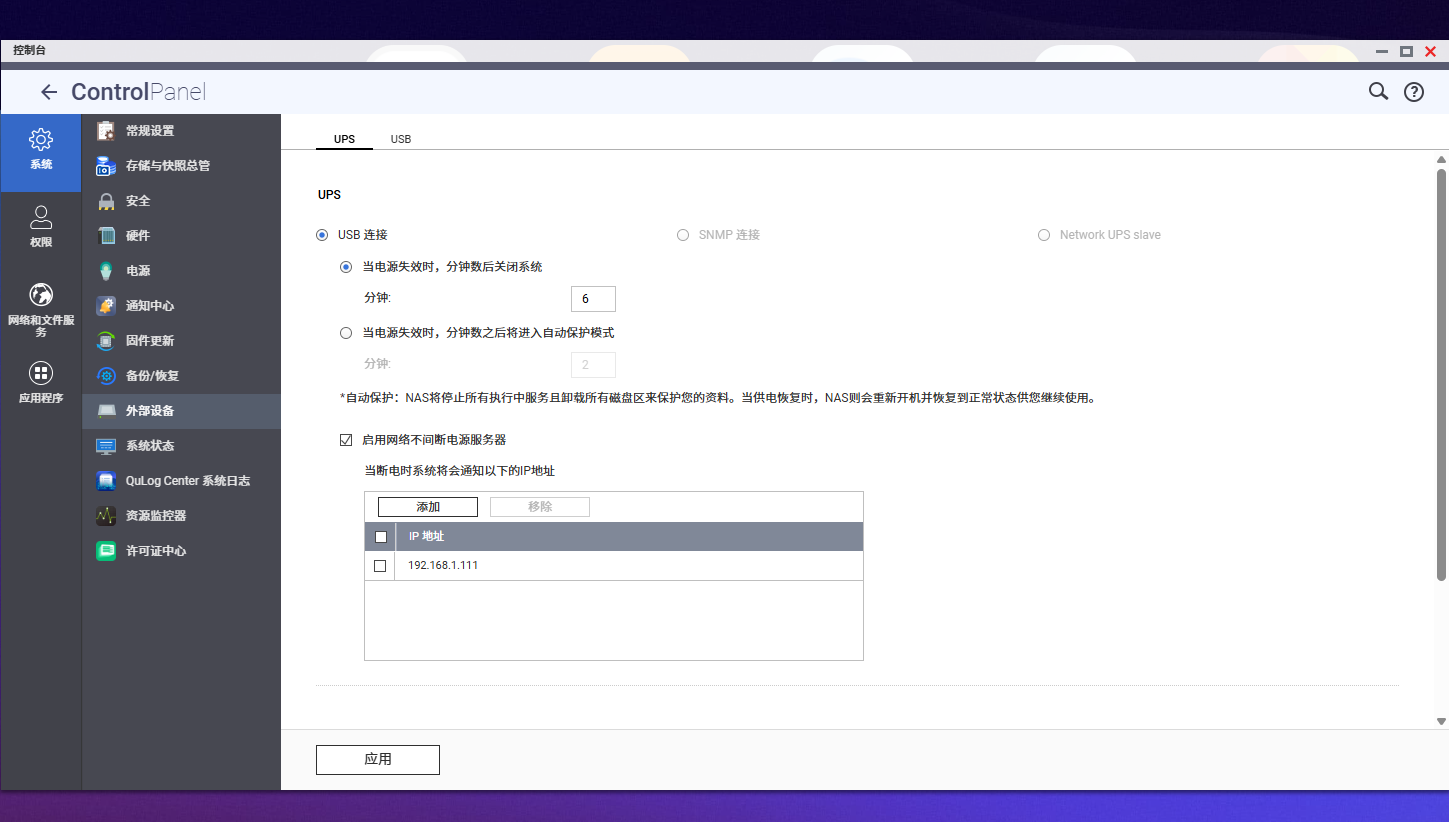
自己也就仅限于控制自己的NAS断电自关机了,虽说IP里面写着通知PVE母鸡关机,但其实完全没在PVE上配置
晚上想到自己过段时间要去外地,心血来潮一次在pve里配置好了NUT client
话不多说,立马开始,先在PVE里安装一下nut-client
安装
apt update
apt install nut-client
配置NUT客户端连接到威联通NAS
先编辑/etc/nut/nut.conf
设置以下字段
MODE=netclient
继续编辑/etc/nut/upsmon.conf,为了方便维护,我把所有相关的脚本全部放到了/upssh文件夹下
# 监控威联通的UPSMONITOR qnapups@<威联通IP> 1 upsmon <密码> slave
设置关机命令
SHUTDOWNCMD "/upssh/pve-shutdown.sh"
断电后等待时间(秒)
FINALDELAY 120
电池低电量时的延迟(秒)
HOSTSYNC 15
设置通知命令
NOTIFYCMD /upssh/upssched
检查NUT连接
root@pve:~# upsc qnapups@192.168.1.5 #配置的UPS服务器地址
Init SSL without certificate database
battery.charge: 100
battery.charge.low: 20
battery.runtime: 1296
battery.type: PbAc
device.mfr: EATON
device.model: SANTAK TG-BOX 850
device.serial: Blank
device.type: ups
driver.name: usbhid-ups
driver.parameter.pollfreq: 30
driver.parameter.pollinterval: 2
driver.parameter.port: /dev/ttyS1
driver.parameter.synchronous: no
driver.version: 2.7.4
driver.version.data: MGE HID 1.39
driver.version.internal: 0.41
input.transfer.high: 264
input.transfer.low: 184
outlet.1.desc: PowerShare Outlet 1
outlet.1.id: 1
outlet.1.status: on
outlet.1.switchable: no
outlet.desc: Main Outlet
outlet.id: 0
outlet.switchable: yes
output.frequency.nominal: 50
output.voltage: 230.0
output.voltage.nominal: 220
ups.beeper.status: enabled
ups.delay.shutdown: 20
ups.delay.start: 30
ups.firmware: 02.08.0010
ups.load: 23
ups.mfr: EATON
ups.model: SANTAK TG-BOX 850
ups.power.nominal: 850
ups.productid: ffff
ups.serial: Blank
ups.status: OL
ups.timer.shutdown: 0
ups.timer.start: 0
ups.type: offline / line interactive
ups.vendorid: 0463
配置自定义的关机脚本<br/>
PVE作为虚拟化平台,我们自然不能让他一下子就关机,而不考虑虚拟机的问题。所以我们的构想是,关机脚本需要先把所有虚拟机休眠(挂起到硬盘,方便恢复),等待全部休眠后再关闭PVE,这样会减少数据丢失的可能<br/>
在查过PVE的官方文档后,发现将虚拟机休眠到硬盘的指令是
qm suspend <vmid> --todisk
先创建一个/upssh/pve-shutdown.sh,内容如下(想要完美脚本的直接跳到最后一步)
#!/bin/bash记录日志
logger "UPS: 开始休眠所有虚拟机到磁盘..."
获取所有运行中的VM
RUNNING_VMS=$(qm list | grep running | awk '{print $1}')
RUNNING_CTS=$(pct list | grep running | awk '{print $1}')休眠所有运行中的VM到磁盘
for vmid in $RUNNING_VMS; do
echo "正在休眠VM $vmid 到磁盘..."
logger "UPS: 正在休眠VM $vmid 到磁盘"
qm suspend $vmid --todisk
done停止所有运行中的LXC容器
for ctid in $RUNNING_CTS; do
echo "正在停止容器 $ctid..."
logger "UPS: 正在停止容器 $ctid"
pct stop $ctid
done等待所有VM休眠完成
echo "等待虚拟机休眠到磁盘..."
while [ $(qm list | grep running | wc -l) -gt 0 ]; do
sleep 5
echo "仍有虚拟机在运行,继续等待..."
donelogger "UPS: 所有虚拟机已休眠到磁盘"
echo "测试完成:所有虚拟机已休眠到磁盘,状态已保存"测试阶段先注释掉
/sbin/shutdown -h now
然后给这个脚本相应的权限<br/>
chmod +x /upssh/pve-shutdown.sh
配置延迟关闭时间
打开/etc/nut/upssched.conf<br/>
修改中间的CMDSCRIPT为
CMDSCRIPT /upssh/upssched-cmd
在最后添加
PIPEFN /run/nut/upssched/upssched.pipeLOCKFN /run/nut/upssched/upssched.lock
AT ONBATT * START-TIMER shutdown 300
AT ONLINE * CANCEL-TIMER shutdown
接下来创建/upssh/upssched-cmd,并写入
#!/bin/bashcase $1 in
    shutdown)
        logger "UPS: 电池供电已5分钟,开始关机流程..."
        /upssh/pve-shutdown.sh
        ;;
    *)
        logger "UPS: 未知命令 $1"
        ;;
esac
同样设置权限<br/>
chmod +x /upssh/upssched-cmd
重启服务
systemctl restart nut-client
systemctl enable nut-client
systemctl restart nut-monitor
systemctl enable nut-monitor
第一次执行出错<br/>
当我满怀信心的开始测试SH脚本能不能正常使用的时候,BUG出现了<br/>
root@pve:~# sh /upssh/pve-shutdown.sh
/upssh/pve-shutdown.sh: line 4: $'\r': command not found
/upssh/pve-shutdown.sh: line 6: syntax error near unexpected token $'do\r''
'upssh/pve-shutdown.sh: line 6: for vmid in $(qm list | grep running | awk '{print $1}'); do
居然出现了Windows格式的换行符,这时候就需要使用dos2unix了<br/>
# 安装dos2unix
apt install dos2unix转换文件格式
dos2unix /upssh/pve-shutdown.sh
dos2unix /upssh/upssched-cmd再次运行测试
sh /upssh/pve-shutdown.sh
第二次执行出错<br/>
我寻思现在应该没啥问题了,结果继续出问题了<br/>
我有一个虚拟机使用了硬盘直通,直接无法休眠了
root@pve:~# sh /upssh/pve-shutdown.sh
正在休眠VM 100 到磁盘...
cannot suspend VM to disk due to passed-through PCI device(s), which lack the possibility to save/restore their internal state
正在休眠VM 101 到磁盘...
Formatting '/mnt/ssd-1024g/images/101/vm-101-state-suspend-2025-08-18.raw', fmt=raw size=9114222592 preallocation=off
State saved, quitting
正在休眠VM 102 到磁盘...
Formatting '/mnt/ssd-1024g/images/102/vm-102-state-suspend-2025-08-18.raw', fmt=raw size=13409189888 preallocation=off
State saved, quitting
正在休眠VM 103 到磁盘...
Formatting '/mnt/ssd-1024g/images/103/vm-103-state-suspend-2025-08-18.raw', fmt=raw size=4819255296 preallocation=off
State saved, quitting
等待虚拟机休眠到磁盘...
仍有虚拟机在运行,继续等待...
该死的PVE居然不支持让直通虚拟机休眠<br/>
于是乎改变策略,让有PCI直通的虚拟机直接执行关机指令,懒得改脚本了,直接丢给Claude重新写一个
#!/bin/bash记录日志
logger "UPS: 开始处理所有虚拟机..."
获取所有运行中的VM和容器
RUNNING_VMS=$(qm list | grep running | awk '{print $1}')
RUNNING_CTS=$(pct list | grep running | awk '{print $1}')处理每个运行中的VM
for vmid in $RUNNING_VMS; do
echo "正在检查VM $vmid..."
# 检查是否有PCI直通设备
if qm config $vmid | grep -q "^hostpci"; then
echo "VM $vmid 有PCI直通设备,执行关机..."
logger "UPS: VM $vmid 有PCI直通,执行关机"
qm shutdown $vmid --timeout 60 &
else
echo "VM $vmid 正在休眠到磁盘..."
logger "UPS: VM $vmid 休眠到磁盘"
qm suspend $vmid --todisk &
fi
done等待处理完成
echo "等待所有操作完成..."
MAX_WAIT=180
WAITED=0while [ $(qm list | grep running | wc -l) -gt 0 ] && [ $WAITED -lt $MAX_WAIT ]; do
sleep 10
WAITED=$((WAITED + 10))
RUNNING=$(qm list | grep running | awk '{print $1}' | tr '\n' ' ')
if [ -n "$RUNNING" ]; then
echo "仍在运行: $RUNNING (已等待 ${WAITED}秒)"
fi
done强制停止超时的VM
if [ $(qm list | grep running | wc -l) -gt 0 ]; then
echo "超时!强制停止剩余的虚拟机..."
for vmid in $(qm list | grep running | awk '{print $1}'); do
echo "强制停止VM $vmid"
logger "UPS: 强制停止VM $vmid"
qm stop $vmid
done
fi停止所有容器
for ctid in $RUNNING_CTS; do
echo "正在停止容器 $ctid..."
logger "UPS: 正在停止容器 $ctid"
pct stop $ctid
donelogger "UPS: 所有虚拟机已处理完成"
echo "完成:所有虚拟机已处理"生产环境取消注释
/sbin/shutdown -h now
root@pve:~# sh /upssh/pve-shutdown.sh正在检查VM 100...
VM 100 有PCI直通设备,执行关机...
正在检查VM 101...
VM 101 正在休眠到磁盘...
正在检查VM 102...
Formatting '/mnt/ssd-1024g/images/101/vm-101-state-suspend-2025-08-18.raw', fmt=raw size=9114222592 preallocation=off
VM 102 正在休眠到磁盘...
正在检查VM 103...
VM 103 正在休眠到磁盘...
等待所有操作完成...
Formatting '/mnt/ssd-1024g/images/102/vm-102-state-suspend-2025-08-18.raw', fmt=raw size=13409189888 preallocation=off
Formatting '/mnt/ssd-1024g/images/103/vm-103-state-suspend-2025-08-18.raw', fmt=raw size=4819255296 preallocation=off
State saved, quitting
State saved, quitting
State saved, quitting
仍在运行: 100  (已等待 10秒)
完成:所有虚拟机已处理
先在已经完全没问题了,就可以把脚本最后一行的关机指令取消注释了,十分完美<br/>
评论 暂无